Quantum DLT8000 - Tape Drive Set-up Guide

Termination
DLT8000 Tape termination is supplied by the SCSI bus and not provided by the tape unit. If the tape drive is the last device on the SCSI bus a terminator must be fixed to it.
SCSI ID
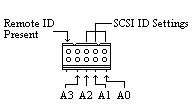
Setting the SCSI ID is simple, a jumper must always be placed on the Remote ID Present position for the host to recognize any ID selection. The default factory setting for the DLT8000 is ID 5.

SCSI
ID

AO

A1

A2

A3

0
1
2
3
4
5
6
7
8
9
10
11
12
13
14
15
OFF
ON
OFF
ON
OFF
ON
OFF
ON
OFF
ON
OFF
ON
OFF
ON
OFF
ON
OFF
OFF
ON
ON
OFF
OFF
ON
ON
OFF
OFF
ON
ON
OFF
OFF
ON
ON
OFF
OFF
OFF
OFF
ON
ON
ON
ON
OFF
OFF
OFF
OFF
ON
ON
ON
ON
OFF
OFF
OFF
OFF
OFF
OFF
OFF
OFF
ON
ON
ON
ON
ON
ON
ON
ON

Quantum DLT8000 SCSI ID set.

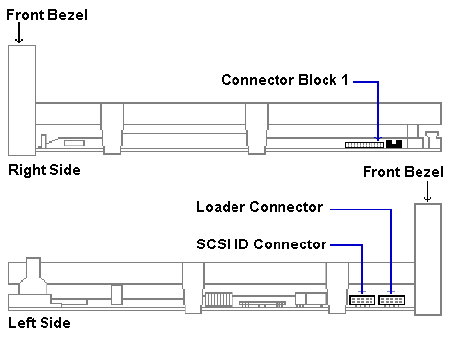
Quantum DLT8000 Set-up diagram
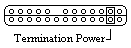
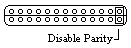
Quantum DLT8000 termination power.                  Quantum DLT8000 parity disable.
To supply termination power for the SCSI bus, place a jumper in position shown on connector block 1.
To disable the parity bit on the DLT8000 place a jumper across pins 1 & 2, located on connector block 1.